Contest 3
FSAs / Regex
A Finite State Automaton (FSA) is a mathematical model of computation comprising all 4 of the following: 1) a finite number of states, of which exactly one is active at any given time; 2) transition rules to change the active state; 3) an initial state; and 4) one or more final states. We can draw an FSA by representing each state as a circle, the final state as a double circle, the start state as the only state with an incoming arrow, and the transition rules as labeled-edges connecting the states. When labels are assigned to states, they appear inside the circle representing the state.
In this category, FSAs will be limited to parsing strings — that is, determining if a string is valid or not.
Basics
Here is a drawing of an FSA that is used to parse strings consisting of x’s and y’s:
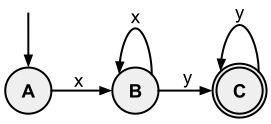
In the above FSA, there are three states: A, B, and C. The initial state is A; the final state is C. The only way to go from state A to B is by seeing the letter x. Once in state B, there are two transition rules: seeing y will cause the FSA to make C the active state, and seeing x will keep B as the active state. State C is a final state, so if the string being parsed ends while the FSA is in State C, the input string is accepted. In State C, seeing additional y’s keeps the machine in state C. The FSA above accepts strings composed of one or more x’s followed by one or more y’s (e.g., xy, xxy, xxxyy, xyyy, xxyyyy).
A Regular Expression (RE) is an algebraic representation of an FSA. For
example, the regular expression corresponding to the FSA given above is
xx*yy*.
The rules for forming a Regular Expression (RE) are as follows:
- The null string (λ) is a RE.
- If the string a is in the input alphabet, then it is a RE.
- If a and b are both REs, then so are strings built using the following rules:
- Concatenation.
ab(a followed by b). - Union.
aUbora|b(a or b). - Closure.
a*(a repeated zero or more times) — the Kleene Star.
- Concatenation.
The order of precedence for Regular Expression operators is: Kleene
Star, concatenation, and then union. Similar to standard algebra,
parentheses can be used to group sub-expressions. For example, dca*b
generates strings dcb, dcab, dcaab, and so on, whereas d(ca)*b
generates strings db, dcab, dcacab, dcacacab, and so on.
If we have a Regular Expression, we can mechanically build an FSA to accept the strings it generates. Conversely, if we have an FSA, we can mechanically develop a Regular Expression describing the strings it parses. For a given FSA or RE, there are many others which are equivalent. A “most simplified” form is not always well defined.
Regular Expression Identities
| # | Identity |
|---|---|
| 1 | (a*)* = a* |
| 2 | aa* = a*a |
| 3 | aa* U λ = a* |
| 4 | a(b U c) = ab U ac |
| 5 | a(ba)* = (ab)*a |
| 6 | (a U b)* = (a* U b*)* |
| 7 | (a U b)* = (a*b*)* |
| 8 | (a U b)* = a*(ba*)* |
RegEx in Practice
Programmers use Regular Expressions (usually referred to as regex) extensively for expressing patterns to search for. All modern programming languages have regular expression libraries.
Unfortunately, the specific syntax rules vary depending on the implementation, programming language, or library in use. An excellent online tool for testing regexes is https://regex101.com/. A very nice exposition is Pattern Matching with Regular Expressions from the Automate the Boring Stuff book.
Here are the additional syntax rules we will use. They are pretty universal across all regex packages.
| Pattern | Description |
|---|---|
| | Separates alternatives. For example, gray|grey matches “gray” or “grey”. |
* | Zero or more occurrences of the preceding element. For example, ab*c matches “ac”, “abc”, “abbc”, etc. |
? | Zero or one occurrences of the preceding element. For example, colou?r matches “color” and “colour”. |
+ | One or more occurrences of the preceding element. For example, ab+c matches “abc”, “abbc”, etc., but not “ac”. |
. | The wildcard matches any character. For example, a.b matches “a7b”, “a&b”, or “arb”. a.*b matches any string with an “a” and a “b” with 0 or more characters in between. |
[ ] | Matches a single character contained within the brackets. [abc] matches “a”, “b”, or “c”. [a-z] matches any lowercase letter. These forms can be mixed: [abcx-z] matches “a”, “b”, “c”, “x”, “y”, or “z”. |
[^ ] | Matches a single character not contained within the brackets. [^abc] matches any character other than “a”, “b”, or “c”. |
( ) | Parentheses define a sub-expression. For example, H(ä|ae?)ndel matches “Handel”, “Händel”, and “Haendel”. |
Sample Problems
Typical problems in the category will include: translate an FSA to a Regular Expression; simplify a Regular Expression; determine which Regular Expressions or FSAs are equivalent; and determine which strings are accepted by either an FSA or a Regular Expression.
Problem 1
Find a simplified Regular Expression for the following FSA:

Solution:
The expression 01*01 is read directly from the FSA. It is in its most
simplified form.
Problem 2
Which of the following strings are accepted by the Regular Expression
00*1*1U11*0*0?
- A. 0000001111111
- B. 1010101010
- C. 1111111
- D. 0110
- E. 10
Solution:
This Regular Expression parses strings described by the union of
00*1*1 and 11*0*0. The RE 00*1*1 matches strings starting with one
or more 0s followed by one or more 1s: 01, 001, 0001111, and so on. The
RE 11*0*0 matches strings with one or more 1s followed by one or more
0s: 10, 1110, 1111100, and so on. Choices A and E match this
pattern.
Problem 3
Which of the following strings match the regular expression pattern
[A-D]*[a-d]*[0-9]?
- ABCD8
- abcd5
- ABcd9
- AbCd7
- X
- abCD7
- DCCBBBaaaa5
Solution:
The pattern describes strings that start with zero or more uppercase letters A–D, followed by zero or more lowercase letters a–d, followed by a single digit. The matching strings are 1, 2, 3, and 7.
Problem 4
Which of the following strings match the regular expression pattern
Hi?g+h+[^a-ceiou]?
- Highb
- HiiighS
- HigghhhC
- Hih
- Hghe
- Highd
- HgggggghX
Solution:
The ? indicates 0 or 1 “i”s. The + after g indicates 1 or more
“g”s, followed by 1 or more “h”s. The [^...] indicates that the last
character cannot be a lowercase a, b, c, e, i, o, or u. The matching
strings are 3, 6, and 7.
Video Resources
Video Guide
Video Guide
Video Guide